How to Download Vimeo Thumbnails on Desktop
- 1
Open Vimeo
Go to vimeo.com and find the video whose thumbnail you want to download.
- 2
Copy the video URL
Click on the video to open it. Copy the URL from the address bar - it looks like https://vimeo.com/123456789
- 3
Paste the URL above
Return to this page and paste the URL into the input field.
- 4
Click Download
Press Download. Multiple thumbnail resolutions will appear - from Max quality down to Small.
- 5
Save the image
Click the Download button next to your preferred resolution to save it.
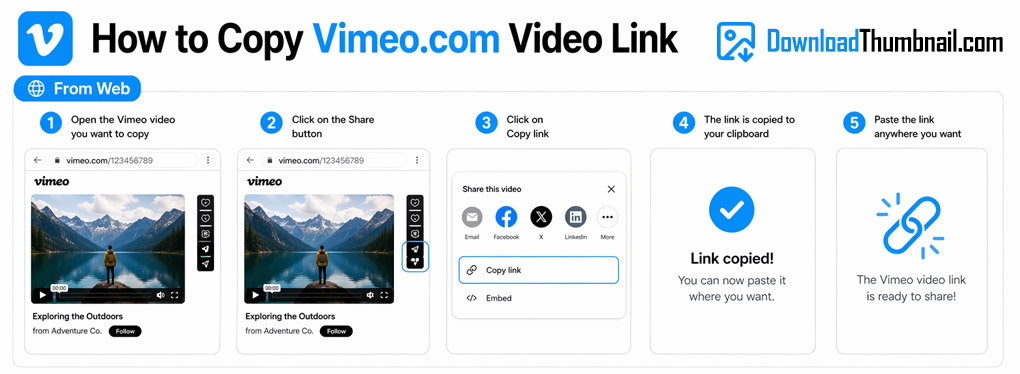
How to copy a Vimeo video URL on desktop to download the thumbnail
How to Download Vimeo Thumbnails on Mobile (Android & iPhone)
- 1
Open the Vimeo app or website
Find the video you want on Vimeo.
- 2
Copy the video link
Tap Share on the video and select Copy Link.
- 3
Open your browser
Open Chrome or Safari and go to this page.
- 4
Paste & Download
Paste the Vimeo link in the input box and tap Download.
- 5
Save to your device
Tap the Download button and the thumbnail will be saved to your phone or tablet.
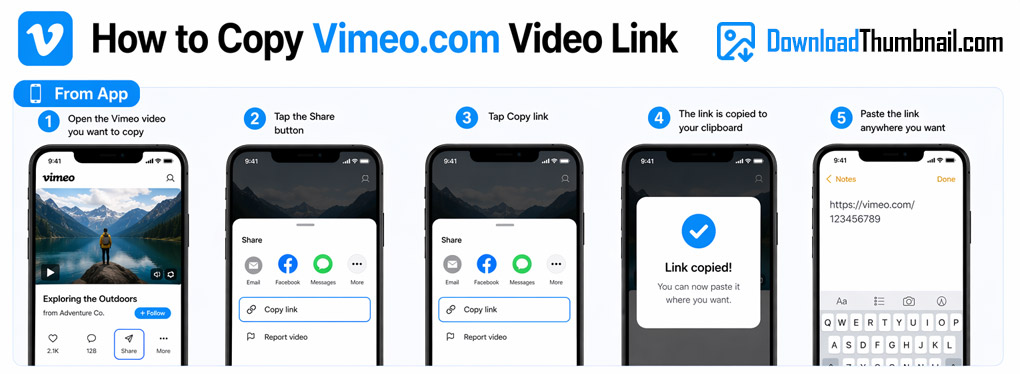
How to copy a Vimeo link on mobile to download the thumbnail
Best Online Vimeo Thumbnail Downloader
Our Vimeo thumbnail downloader lets you save the cover image of any public Vimeo video in multiple resolutions - from the maximum 1280×720 HD quality down to smaller sizes, all for free. Vimeo is known for high-quality creative video content, and our tool ensures you can download those professional-grade thumbnails with ease. No Vimeo account is needed - just paste the URL and get the image in seconds.
Where to Save Vimeo Thumbnail Images?
Vimeo thumbnails can be saved to any device - PC, Mac, iPhone, iPad, or Android. On desktop, the file goes directly to your Downloads folder. On mobile it lands in your gallery or Files app. Vimeo thumbnails are high-quality JPEG images perfect for use in presentations, portfolios, or design projects.
Frequently Asked Questions
Can I download thumbnails from private Vimeo videos?
No. Private Vimeo videos require a password or are restricted to specific viewers, so our tool cannot access their thumbnails.
How many resolution options are available?
Our tool provides up to 4 resolutions: Max (1280×720), Large (640×360), Medium (200×150), and Small (100×75) - depending on what Vimeo has available for that video.
Is this tool free to use?
Yes, completely free with no registration or download limits.